
Control-M
Control-M is an enterprise workload automation and job scheduling platform developed by BMC Software that serves as a centralized orchestration hub for managing complex batch processing workflows across heterogeneous IT environments.
Layout (XML tags)
The extracted Control-M scheduler follows XML syntax with a structured layout like the following example.
<?xml version="1.0" encoding="utf-8"?>
<DEFTABLE xmlns:xsi="http://www.w3.org/2001/XMLSchema-instance" xsi:noNamespaceSchemaLocation="Folder.xsd">
    <FOLDER FOLDER_NAME="F1">
        <JOB JOBNAME="JOB1" PARENT_FOLDER="F1" JOBISN="1" TASKTYPE="JOB" MEMNAME="JCLNAME1">
            <OUTCOND NAME="CONDITION1" SIGN="+"/>
        </JOB>
        <JOB JOBNAME="JOB11" PARENT_FOLDER="F1" JOBISN="2" TASKTYPE="JOB" MEMNAME="JCLNAME2">
            <INCOND NAME="CONDITION1" AND_OR="A"/>
            <OUTCOND NAME="CONDITION1" SIGN="-"/>
            <OUTCOND NAME="CONDITION2" SIGN="+"/>
        </JOB>
    </FOLDER>
    <SMART_FOLDER SMART_FOLDER_NAME="SF1" PARENT_FOLDER="F1">
        <JOB JOBNAME="JOB2" PARENT_FOLDER="SF1" JOBISN="1" TASKTYPE="JOB" MEMNAME="%%VAR">
            <INCOND NAME="CONDITION2" AND_OR="A"/>
            <OUTCOND NAME="CONDITION2" SIGN="-"/>
            <VARIABLE NAME="%%VAR" VALUE="JCLNAME3" />
        </JOB>
    </SMART_FOLDER>
</DEFTABLE>
Based on the example above, job dependencies are as following:
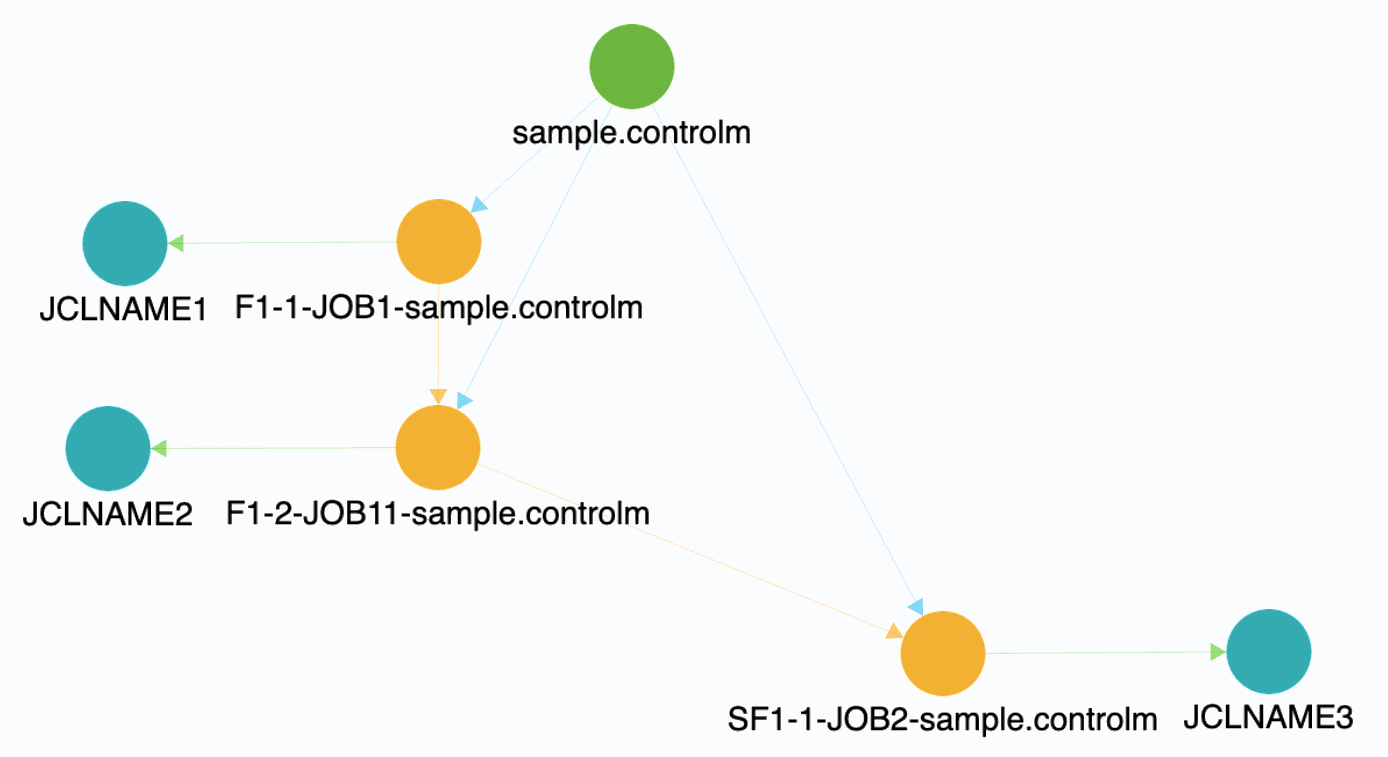
Jobs organization
- DEFTABLE: Tag
DEFTABLEis the root element to indicate the beginning and end of a set of folder and job definitions. - SMART_FOLDER & FOLDER: Tag
SMART_FOLDERand tagFOLDERare organizational structures for managing jobs, where they contain individual job definitions. They can be considered as the job groups.
JOB definition
Tag JOB can imply the job to be triggered. Inside JOB tag, variety of attributes can be configured, such as the job name, member name, task type, etc.
VARIABLE
Tag VARIABLE is the dynamic placeholder that stores values and can be used throughout job definitions for flexible automation and parameterization.
INCOND & OUTCOND
Tag INCOND and tag OUTCOND configure the control job mechanism based on external events or states.
INCONDprovides requirements for triggering current job.- Attribute
NAMEstates the required event name. In the example below, CONDITION1 is required for triggering current job, which was defined in theOUTCONDtag in the first job JOB1 (see Layout (XML tags)) - Attribute
AND_ORstates the relationships of the requirements. It functions as logical operators. Both AND and OR relations will consider the event to be the predecessor.
- Attribute
OUTCONDprovides event outcome.- Attribute
NAMEstats the name of the outcome. This name could be used inINCONDtag in other jobs. - Attribute
SIGNstats the action of the name. A positive sign (+) adds the event name and a negative sign (-) removes the event name. When the event name is removed, the next jobs will not be able to use the event as a predecessor. i.e. been configured inINCOND.
- Attribute
- Both
INCONDandOUTCONDworks together to build the links among jobs.
<INCOND NAME="CONDITION1" AND_OR="A"/>
<OUTCOND NAME="CONDITION1" SIGN="-"/>
<OUTCOND NAME="CONDITION2" SIGN="+"/>
Attributes
JOBNAME
Attribute JOBNAME implies the unique identifier assigned to each job definition within a folder.
JOBNAME="JOB1"JOBISN
Attribute JOBISN (Job Internal Sequence Number) implies the unique numeric identifier automatically assigned to each job execution instance.
JOBISN="1"TASKTYPE
Attribute TASKTYPE implies the category or type of job being executed, determining how Control-M processes and handles the job
TASKTYPE="Job"
TASKTYPE="Command"
TASKTYPE="SMART Table"
Task type "SMART Table" exists in SMART_FOLDER tag.
Task type "Job" and "Command" exist in JOB tag, which executes scheduled tasks by running batch job (JCL) and through command line, respectively.
MEMNAME (MEMBER_NAME)
Attribute MEMNAME or MEMBER_NAME implies the triggered batch job (JCL).
MEMNAME="JCLNAME"CMDLINE
Attribute CMDLINE implies the field that contains the actual executable command, script, or program that the job will run when executed.
CMDLINE="/path/to/utility %%JOBNAME"- Command line syntax
Partially supported
Depending on how many arguments required by the utility, only specific utilities are supported."/path/to/utility %%JOBNAME"- Fully supported
Call JCL (default) / PROC / program. Supports PARM and multi-calls.
CALL PGM(PGM_NAME) PARM('');
CALL PGM(C405HFIFA);
CALL (C409E0266);CALL (C409E0267);
CALL PGM(C409QENDMS) PARM('1');CALL PGM(C409QENDMS) PARM('2');CALL PGM(C409QENDMS) PARM('3');CALL PGM(C409OSTOEM);CALL PGM(C409OSTODM) PARM('prod');
Submit job
SBMJOB CMD(CALL PGM(DAILYPROC)) JOB(DAILYRUN) JOBQ(QBATCH) USER(QPGMR);
SBMNETJOB FILE(L910/QRJESRC) TOUSRID((E469JOB COP)) MBR(D4690M86);
PARENT_FOLDER
Attribute PARENT_FOLDER implies the hierarchical folder structure where a job or subfolder is contained, establishing organizational relationships and inheritance properties.
PARENT_FOLDER="FOLDER_NAME"