
Architecture
What is SDE Regression Testing Snapshot (RTS)?
AWS Transform for mainframe modernization projects use a test case approach based on customer inputs to validate the functional equivalence of modernized Java code. The number of test cases ranges from hundreds to thousands, depending on the project size. They are then integrated into a Regression Testing suite for regular replay. Processing test cases is crucial but can be time-consuming or costly due to repetitive data handling.
A test case involves database dumps before and after test execution to compare results. Different development workflows may involve separate teams for data migration, code transformation, test case setup, and debugging. Database restorations are essential but time-consuming, often taking hours for large projects.
Regression Testing Snapshot (RTS) allows team member to easily create snapshots, restore snapshots, and also create DB instances or delete them. RTS has a simple user interface (UI) and API. RTS can manage RDS database for development or database on EC2.
Target audience
SDE RTS is targeted for customers engaged in AWS Transform for mainframe modernization project. The goal is to provide a tool that can be installed in AWS customer accounts and used by partners or customer’s delivery teams. This tool is a component of the development environment called AWS Transform for mainframe Standard Delivery Environment, see AWS Transform for mainframe Standard Delivery Environment (SDE).
General architecture
RTS relies heavily on AWS services, it uses AWS meta-data such as tags and takes its configuration from SSM Parameter Store. It is a 2 tier application, with a Single Page Application implemented with React and a back end implemented with nodejs, EpxressJS, open-api, AWS SDK & Amplify/Cognito.
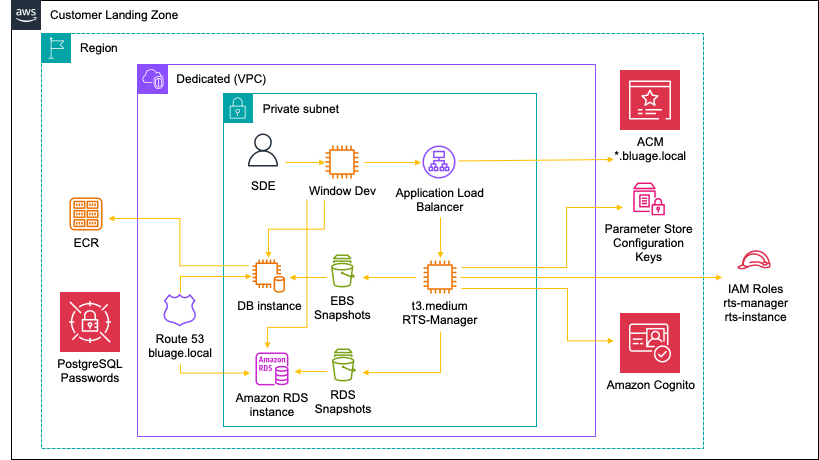
Architecture dependencies
- RTS-Manager (Front End / Back End)
- Image AMI Linux 2023 (with Docker & docker-compose installed)
- ReactJS (Front End), version 18
- NodeJS (Back End), version 18
- ExpressJS, version 4.21.1
- Open API, version 12.1.3
- AWS SDK, version 3
- IAM Role (to create/delete EC2 instances, read Parameter Store…)
- AWS Template for DB instance creation
- SSM Parameter Store
- Route 53
- EBS Volumes / Snapshots to restore volumes
- RDS
- Secret Manager
- NGiNX used to serve Front & Back end, version 1.26.2
Redis used as a lock mechanism and also to keep track of restoration time, version 6.2.14
Use Cases / Workflow
Application usage and access
RTS is not intended for public access and by default accessible to all developers/testers/managers with access privilege to the VPC/subnet. Application Load Balancer is restricted to subnet mask IP.
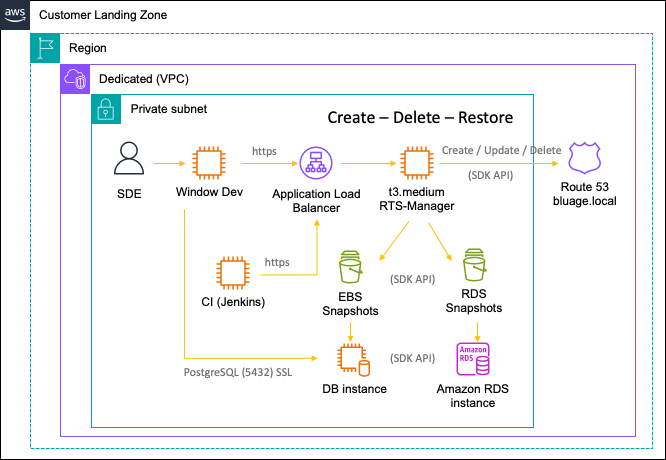
- Users connect to RTS Manager from the VPC using SSM.
- RTS Manager expose a Single Page Application and an API.
- RTS main function is to automate DB creation/restoration using AWS SDK.
- For EC2 instance, docker is used to run the Database.
For RDS, RTS holds a set of predefined parameters to create instances.
Application end point/features
RTS has 5 main use cases around database host creation, data restoration, host termination, snapshot creation, and deletion. Furthermore, it is also possible to edit and push or modify configuration, allowing users to add or remove DB technologies or RDS configuration.
Some use cases are trivial, and do not have a model representation:
- SSM Parameter Store Configuration keys. Configuration can be changed
inby modifying parameter store keys. Please note it takes up to 5 minutes to be reflected in RTS Application as these keys are cached in Redis. - Snapshot deletion. The user or CI (Continuous Integration) can remove a snapshot only if that snapshot is not used.
- RDS deletion. It allows the user or CI to terminate an RDS instance, after removing the CNAME record from route 53 and sends notification to slack and or Chime.
- RDS snapshot creation. It allows the user or CI to create a snapshot and send notification to slack or Chime.
- RDS snapshot deletion. The user or CI can remove a snapshot only if that snapshot is not used and send notification to slack or Chime.
DB Host (EC2/RDS) edition. It allows user to change the tag “Name” or edit the instance type (i.e. t2.micro > t3.medium or db.t3.micro > db.t3.medium). Instance type change sends notification to slack or Chime
Creation workflow with EC2/Docker
In this workflow user can create a DB instance with an empty volume. The system DB is initialized by the DB engine.
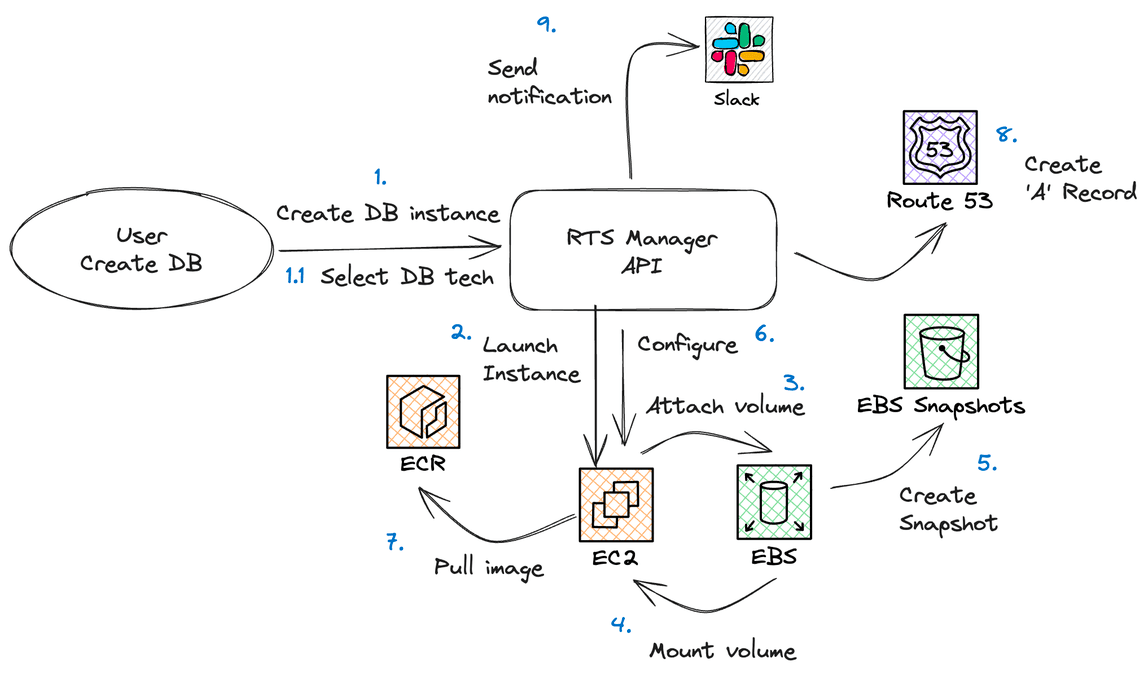
- Create DB instance from RTS Manager UI or API
- Select DB tech, this allow users to select a preconfigured technology. The preconfiguration is done via an SSM Parameter Store key. In this preconfigured technology, we reference a yaml docker-compose configuration, also contained in a Parameter Store key, that will be executed on the EC2 instance.
- Launch Instance will spin an EC2.
- Attach volume will create a volume and attach it to the EC2 .
- Mount volume on EC2
- Create snapshot from the attached volume
- Configure will upload docker-compose configuration to EC2.
- Pull image will happens when docker-compose up -d command is issued.
- Docker images are limited to private ECR. Automatic scan should be activated on private ECR.
- Create A record in Route 53 with the name of the EC2 instance on bluage.local domain. "A Record" are used as DNS fully qualified name (FQDN) to point to an EC2 instance's IP address. The end client, a modernized Java application, uses the FQDN to connect to the database hosted on the EC2 instance. For example: my-db-23.bluage.local:5432.
Send notification on slack (using workflow) or Chime (This is optional)
Creation workflow with RDS/Docker
In this workflow, the user creates an RDS instance in development mode.
- Create DB Instance from RTS Manager UI or API. In this action, the user will also select volume
sspecification (size, type, IOs). - Select RDS tech, depending on configuration entered in RTS (SSM Parameter Store).
- Read RDS Config. from SSM Parameter Store.
- Launch RDS (Dev) instance.
- Create CNAME record in Route 53. A CNAME is used to point to the name of the RDS instance.
- Send notification on Slack or Chime (this is optional).
Restoration workflow with EC2/Docker
In this workflow, the user restore a DB by restoring.
- Restore DB from UI or API
- Stop docker
- Unmount volume
- Detach volume, detach the volume from EC2
- Delete volume
- Create volume from snapshot
- Attach volume
- Mount volume
- Start docker
Check docker health, it checks the healthy status of the container.
Delete workflow with EC2/Docker

- Delete DB, delete an EC2 instance using UI or API.
- Terminate EC2
- Delete volume
- Delete ‘A’ record from Route 53
Optional - Send notification on Slack and or Chime
Delete workflow with RDS
- Terminate RDS instance, Launch API command to delete instance.
- Delete CNAME record in Route 53.
- Send notification slack or Chime (this is optional)