
Building pipeline flow chart
Introduction
This documentation describes the flows inside the Building Pipeline.
The Building Pipeline creates a Docker image of the modernized application and deploys it on ECS. There are 2 Building Pipelines: one for each environment, INT and UAT. They respectively refer to the develop branch and the master branch of the gitlab-modern-application repository.
Basically, these 2 pipelines are the same. They only differ by the execution of Sonarqube.
Flow chart
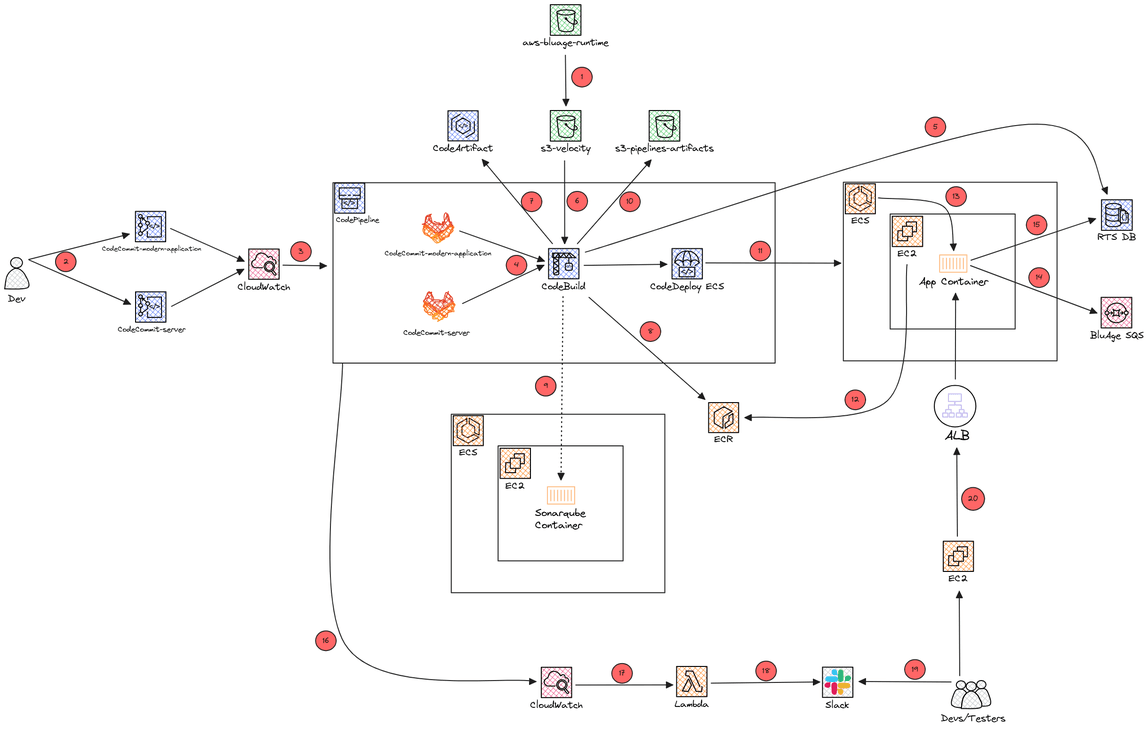
Number explanation
- Developers fetch the version they want of the Velocity sources (
.war,.jarand config files) from the AWS Transform for mainframe refactor Toolbox and put them onto thes3-velocityS3, present in the client account - Developers push code modifications on
gitlab-modern-application, or modify Tomcat config files ongitlab-server - The pipeline is triggered by CloudWatch due to the new commit
- CodeBuild fetches the GitLab sources
- The SDE Regression Testing Snapshots database is initially created if it does not exist. This step is skipped if the database already exists
- CodeBuild fetches the Velocity runtime (
.warand.jarfiles) from thes3-velocityS3 - Dependencies are pushed on CodeArtifact. Developers use CodeArtifact to build the application on their Windows EC2
- A Docker image of the modernized application is built and pushed on ECR
- Sonarqube analyzes the code. This step is only executed on UAT
- Artifacts (
.warand.jarfiles) are pushed on thes3-pipelines-artifactsS3 of the client account as a backup - CodeDeploy ECS modifies the app task definition and asks ECS to deploy the new image
- The EC2 fetches the application Docker image on the ECR
- ECS deploys the new image into the cluster
- The application connects to the SDE RTS database
- When the pipeline ends, CloudWatch is triggered, and then it triggers a Lambda sending a Slack message on a specific channel
- CloudWatch triggers a Lambda function
- The Lambda sends a curl request to the Slack webhook for sending a message to the channel of the project team
- Developers receive a Slack message with the state of the pipeline
Developers can connect to the application through their Windows EC2 for checking their modification
More information
gitlab-modern-applicationcontains the modernized application codegitlab-servercontains the config files of Tomcats3-velocitycontains Velocity binary files (.warand.jarfiles)