
Testing pipeline flow chart
Introduction
This document describes different workflows inside the Testing Pipeline.
The Testing Pipeline automatically adds jobs on Jenkins based on the tree structure of the test case repositories in gitlab-test-cases. Jobs can then be executed via Jenkins and all the reports generated will be available on Jenkins.
All the jobs are also executed every night, except the weekend.
Flow chart
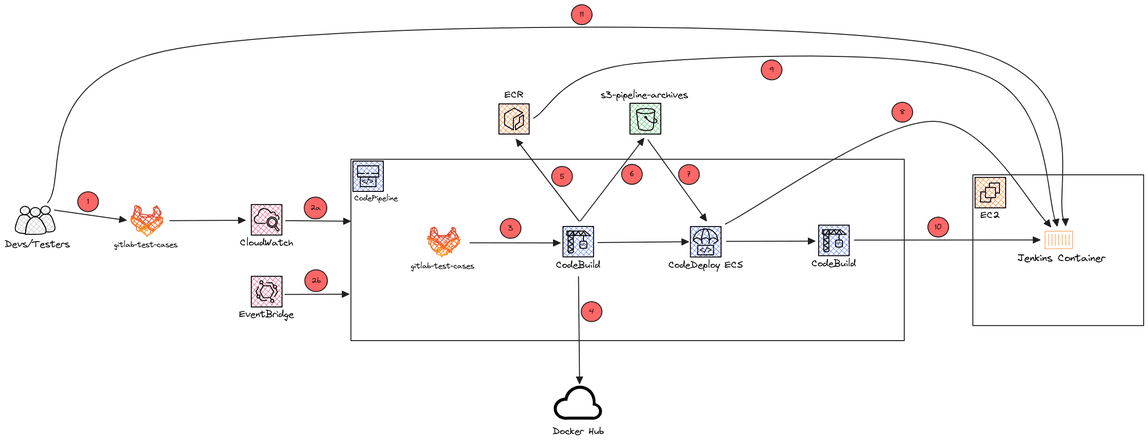
Jenkins CodePipeline
Jenkins job script
Number explanation
Jenkins CodePipeline
- Developers or Testers push a new test case or modify an existing test in
gitlab-test-cases -
- The
codepipeline-jenkinsis triggered by CloudWatch due to a new commit - The pipeline is triggered every night except the week end for running all test cases
- The
- CodeBuild fetches the source from GitLab
- The Jenkins server and Jenkins node Docker images are fetched from Docker Hub (This step is executed once and won’t be executed again as long as the Jenkins version did not change in the Parameter Store)
- The images are slightly modified and pushed on ECR (This step is executed once and won’t be executed again as long as the Jenkins version did not change in the Parameter Store)
- The
docker-compose.ymlfile is created and pushed in Amazon S3 bucket as an artifact - CodeDeploy fetches the sources (appspec.yml, docker files, etc)
- CodeDeploy deploys files and especially the
docker-compose.ymlfile on the Jenkins EC2. Jenkins is also started - The Jenkins EC2 fetches the Jenkins image from ECR and Jenkins is launched
- CodeBuild automatically adds the new jobs on Jenkins in the right views and modifies the job configuration, if changed. If the pipeline has been launched by EventBridge then this CodeBuild will ask Jenkins to run all the jobs. This pipeline is triggered every night by EventBridge except the week end.
Developers and Testers can connect to Jenkins to see the new jobs added and run them
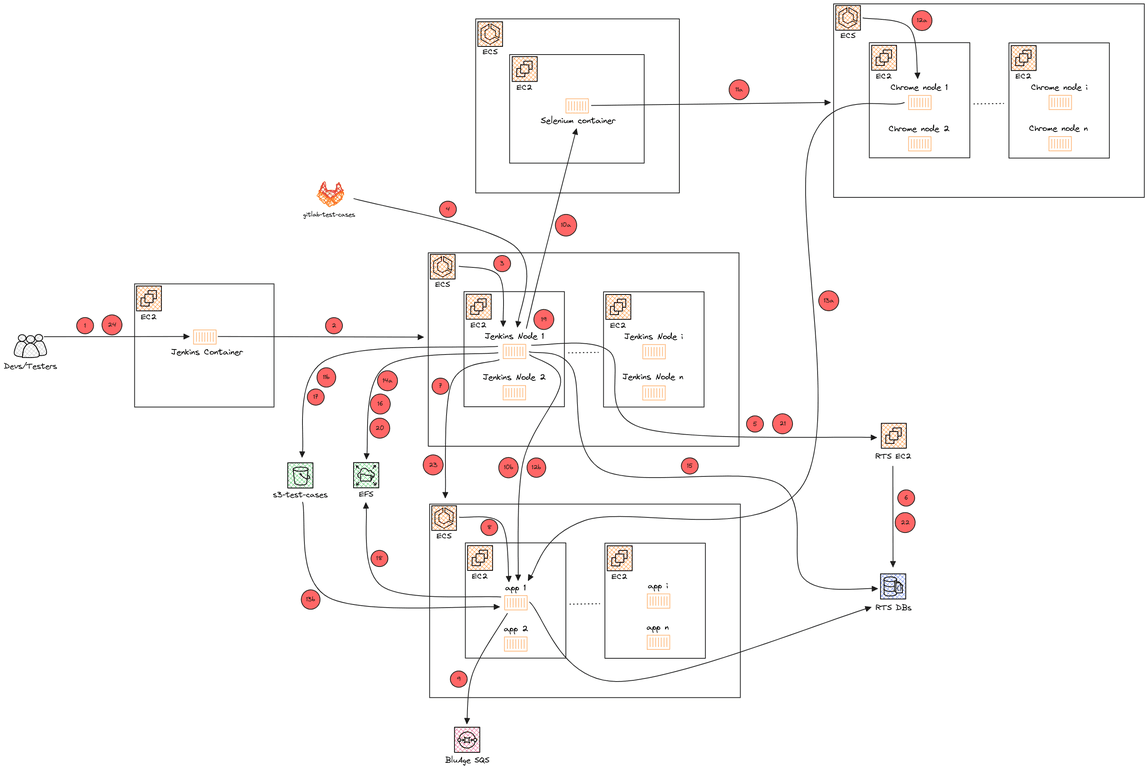
Jenkins job script
- A developer or tester run a job on Jenkins
- Jenkins ask ECS to create a new Jenkins node
- ECS creates a new Jenkins node container on its cluster
- Scripts and test case config files from
gitlab-test-casesare fetched - We ask SDE RTS to create a DB server based on the snapshot name given by the test case. The DB server can contain multiple DBs (app DB, JICS, Bluesam, etc)
- The DB server is created
- We ask the test case ECS cluster to create a container of the modernized application with the correct environment (INT or UAT)
- The cluster creates the container.
- Depending on if it is a Selenium (A) or a Groovy (B) test case, the script will behave differently until step 14.
- The Jenkins node ask the Selenium hub to run a
.sidefile on the app container - The Jenkins node container make a curl request on the app container to run a groovy script
- The Jenkins node ask the Selenium hub to run a
-
- The Selenium hub ask ECS to create a chrome node
- Once the groovy finished, we push a script in the
s3-test-casesS3
-
- ECS creates a chrome node container
- We run an
aws ssm commandon the app container
-
- The chrome node executes the selenium test on the app container
- Using
aws ssm command, we fetch the script from the S3 and then run the script on the app EC2 allowing us to fetch the app logs then we get the result by usingaws ssm list-commands
- A Selenium report is generated and then pushed on the EFS
- We run the CompareTool script on the SDE RTS database to compare the DB modified by the server and the DB expected
- A CompareDB report is generated and then pushed on the EFS
- In case the Selenium script or groovy script made the app container generate some files. We put a script in the
s3-test-casesAmazon S3 bucket - Using
aws ssm command, we fetch the script from the S3 and then run the script on the app EC2 allowing us to fetch the files generated by the application and we push them on the EFS - We run the CompareTool script to compare the files generated by the app container and the files expected
- A CompareFile report is generated and then pushed on the EFS. A Jacoco report is generated and push on the EFS as well.
- We ask SDE RTS to delete the DB created for this test
- SDE RTS deletes the DB of the test
- We ask ECS to delete the app container created for this test. Files pushed in the S3 and EFS during the test are also deleted.
Developers and Testers can check all the reports, application logs and script job logs on Jenkins
More information
gitlab-test-casescontains the test case config file and everything to run it (DB snapshot name, SQL scripts, etc). It also contains the deployment scripts for thecodepipeline-jenkinsand the Jenkins job scripts