
Admin guide
Overview
Below is the administration guide for “SDE Regression Testing Snapshot Manager”. It covers setup after CDK installation, as well as logs and troubleshooting. RTS allows you to set up two types of environments: RDS and DB on EC2. PostgreSQL on EC2 works with Docker and Docker Compose, while RDS allows you to create an RDS database. For RDS, a configuration object is needed and can be set in a parameter. For DB on EC2, a Docker Compose definition is required.
RTS Manager operation guide
The RTS application is hosted on an EC2 instance and runs on a t3.medium instance using the Amazon Linux 2023 image. The instance name follows the format “RTS_MANAGER_<DateTime of Installation>”. Only HTTPS is required to access the RTS application and API. Multiple services are used to run the application: Docker Nginx, Docker Redis, DWS Service, and DWS-WS Service.
The main installation folder is /opt/dws-release.
Services
- nginx, expose React front application & API on port 80.
- It can be restarted using docker-compose from the folder /opt/dws-release/docker.
- Configuration file related to nginx can be found in /etc/nginx/conf.d/default.
- redis: is used to store restoration time & restoration locks (no concurrent restoration are allowed).
- logs can be accessed using
journalctl -u nginx|redis
- logs can be accessed using
- Services dws & dws-ws, these are standard linux service they can be accessed using “
service” or “systemclt” commands. Their definition is located in folder/etc/dws.- dws service is the backend application it exposes the API on port 3030.
- this service automatically restarts in 60sec.
- dws-ws service expose a WebSocket on port 8080.
- this service automatically restarts in 60sec.
- Service logs can be accessed using “
journalctl -u dws.service|dws-ws.service”
- dws service is the backend application it exposes the API on port 3030.
Note dws & dws-ws service listeners are proxied by nginx. To see the configuration of nginx look at /opt/dws-release/docker/nginx/sites-available/default.
Service failure:
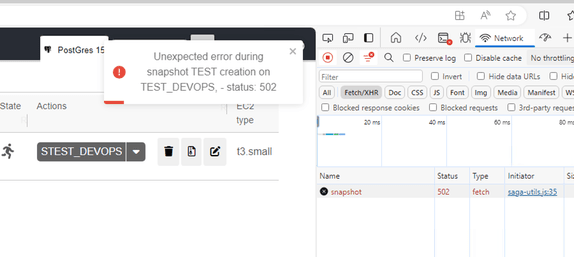
- If the service dws is down, all API end point will respond with http code 502.
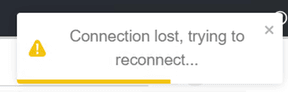
If the service dws-ws is down the application will display the following alerts. This alert can popup when application tries to connect or reconnect to the WebSocket served by “dws-ws”:
Logs on RTS Manager instance.
Other logs such as database restoration or creation logs can be found in /opt/dws-release/logs.
- Application logs, /opt/dws-release/logs/app-error and /opt/dws-release/logs/app-info
- nginx access logs /opt/dws-release/logs/access.log
- DB instance creation|restoration|deletion logs can be access in /opt/dws-release/logs/instances. Those logs are organized by database instance name and each database has its own log file.
Example of logs:

Logs on CloudWatch
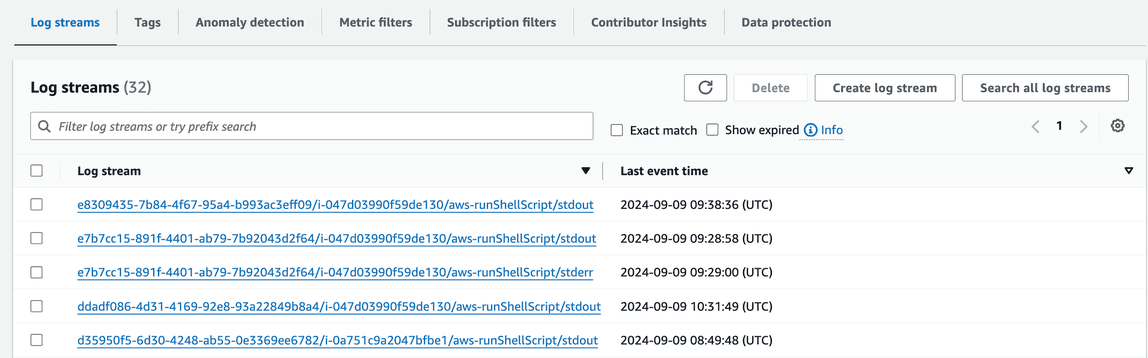
Some logs are sendt to CloudWatch, t. These logs are mainly logs for DB instance creation|restoration|deletion. They are organized by instance id.
- RTS application logs for service dws & dws-ws are in log group “dws-manager” stream “info”.
- Database instances logs, are in log group RTS_DB_HOSTS log group the stream name contains the instance id. Please note that CloudWatch, can sometimes capture the wrong error stream. Some output in stderr should be in stdout.
Example:
User configuration with Cognito
RTS users are configured in Cognito user pool. You can access it via AWS web console or using AWS CLI. By default, users can access the application, and are given a standard role. Standard user can perform all read operation list all database and in addition they can launch database restoration. All other operations require “administrator” access. Administrator access can be given or removed to any user by setting up a custom role (see below: Step - set up admin role).

REST API operations with roles:
| Access type | Service | Operation | Description |
|---|---|---|---|
| Standard | /api/v1/server | GET | Returns a list of servers |
| Admin | /api/v1/server | POST | Create a server |
| Admin | /api/v1/server | DELETE | Delete a server |
| Standard | /api/v1/server/{server name} | GET | Get server description |
| Standard | /api/v1/restore/{server name}@{snapshot name} | GET | Launch server restoration |
| Admin | /api/v1/server/{server name} | PUT | Update a server |
| Standard | /api/v1/snapshot | GET | Return list of snpashots |
| Admin | /api/v1/snapshot | POST | Create a snapshot |
| Standard | /api/v1/snapshot/{tag name} | GET | Get a list of snapshot by tag name |
| Admin | /api/v1/snapshot/{tag name} | DELETE | Delete snapshots by tag name |
| Standard | /api/v1/parameter/ssm | GET | Get the list of SSM Parameter Store key & value |
| Standard | /api/v1/parameter/instance | GET | Get the list of instance type allowed |
Default configuration user “devops” & password for CI/CD/CT
By default “devops” user is configured. This user allows the CI/CD/CT to use RTS service. The password for this user can be retrieved in the AWS Secrets Manager:

When accessing RTS API, the request must be authenticated. It requires three parameters:
- user name: devops
- password: should be retrieved from AWS Secrets Manager
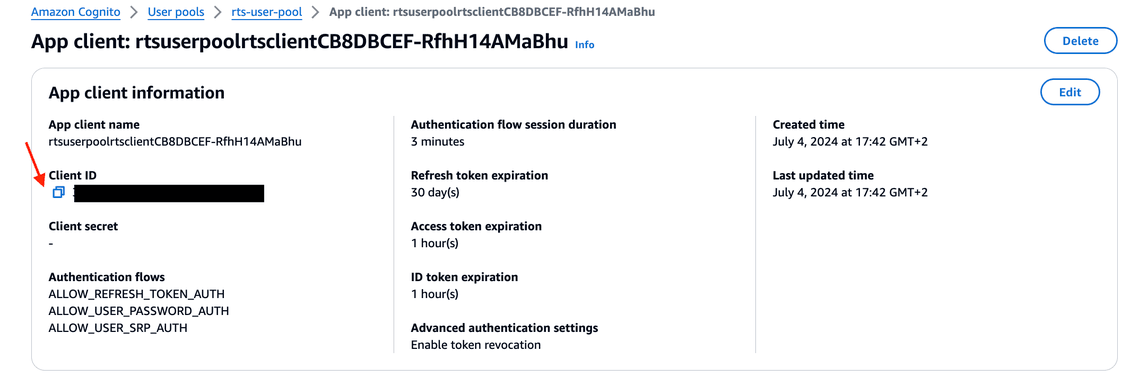
- client ID: is retrieved from AWS Cognito: “
rts-pool-user”, under the section “Application Integration” “rtsuserpoolrtsclient....”:
See below a “curl” example with “jq”:
ID_TOKEN=$(curl -X POST "[https://cognito-idp.eu-west-3.amazonaws.com/](https://cognito-idp.eu-west-3.amazonaws.com/)" \
-H 'X-Amz-Target: AWSCognitoIdentityProviderService.InitiateAuth' \
-H 'Content-Type: application/x-amz-json-1.1' \
-d '{ "AuthParameters" :{ "USERNAME" : "devops",
"PASSWORD" : "<Password from secret manager>" },
"AuthFlow" : "USER_PASSWORD_AUTH",
"ClientId" : "<Cognito client ID>" }' | jq -r '.AuthenticationResult.IdToken')
curl -k '[https://dws-manager.bluage.local/api/v1/parameter/ssm?readMode=k](https://dws-manager.bluage.local/api/v1/parameter/ssm?readMode=k)' \
-H 'accept: application/json' \
-H "authorization: Bearer $ID_TOKEN"
Step - add a standard user
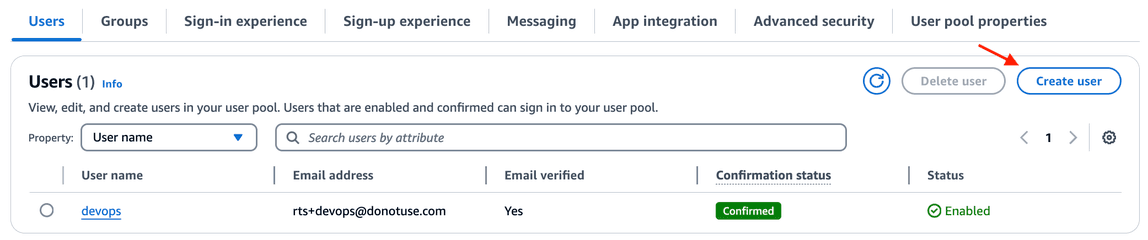
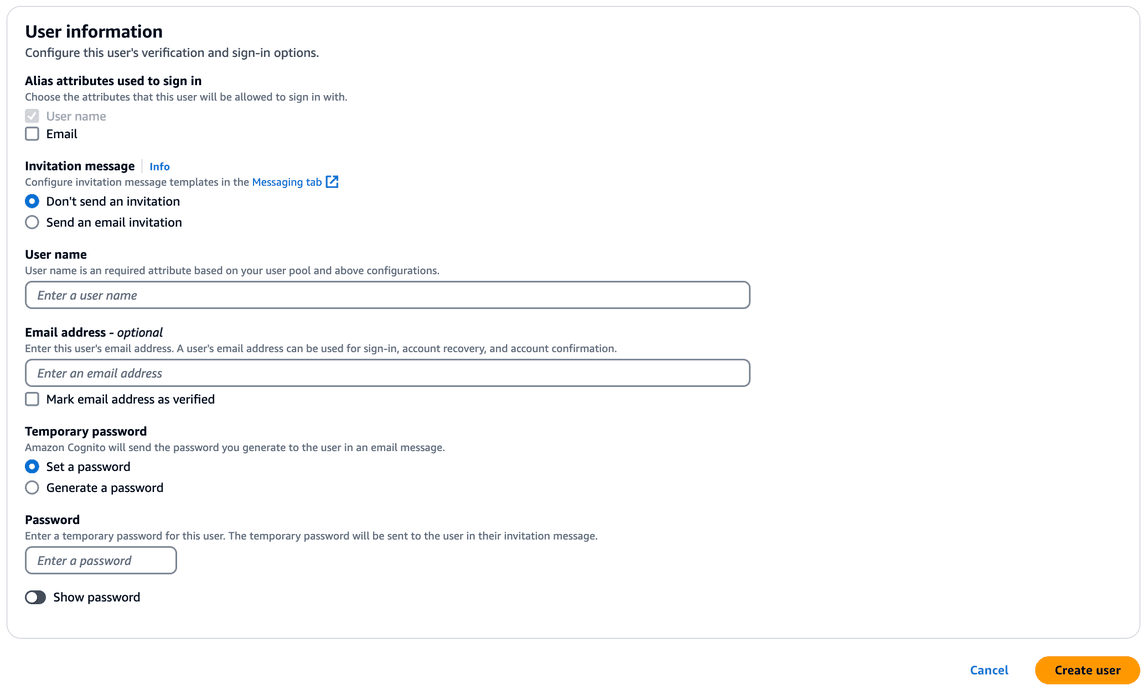
Access AWS Cognito “rts-user-pool” and click on “Create User”.
The password set at this point needs to changed once the user is logged in.
Step - set up admin role
In user pool, select a user and click “Edit” in “User attributes” section. Then click “Add Attribute”. Select “custom:role” and finally set the value to “admin”:

Click “Save changes”
SSM Parameter Store key configuration
Below are all keys needed to configure RTS. These keys/setting can be accessed in AWS web console SSM > Parameter Store.
- /EDR/CONFIG contains a configuration object mainly used for Redis. As for now Redis is used locally on RTS Manager host.
{
"redis": {
"host": "localhost",
"port": 6379
}
}
- /EDR/DB/INSTANCE/LAUNCHTEMPLATE, contains the name of the launch template used to spin EC2 instances.
DWS_LAUNCH_TEMPLATE
- /EDR/DB/SECRETMANAGER/SSH/KEY, holds the key name in AWS Secrets Manager containing the SSH encryption key to connect to DB on EC2 or RTS Manager.
DWS-MANAGER-PRIVATE-SSH-KEY
- /EDR/DISK/DEFINITION/IOPS holds the AWS EBS persistent default IOPs (deprecated)
- /EDR/DISK/DEFINITION/TYPE holds the default AWS EBS persistent volume class storage type (deprecated)
- /EDR/DNS/KEY contains AWS Route 53 Zone id pointing to bluage.local (could be redefined)
Z0251375BK5IU3B0H6IA
- /EDR/DOCKER/COMPOSE/INSTANCES, contains the definition for databases available in RTS Manager. This will produce the tab menu to select a database in RTS Manager web application. In case of multiple versions of the DB this object can contain more than two entries.
- name: Name displayed in header
- key: Name of the SSM key containing the definition.
- icon: graphic displayed in RTS Manager tab. Possible value is “
postgres” | “rds”
[
{
"name": "PostGres 15",
"key": "/EDR/DOCKER/COMPOSE/YAML",
"icon": "postgres"
},
{
"name": "RDS PostGres",
"key": "/EDR/RDS/CONFIGURATION/POSTGRES",
"isRDS": true,
"icon": "rds"
}
]
Rendering example:

- If you make changes to this configuration, make sure that all users click on the “round arrow” as shown above. This will reload the parameters and refresh the tabs.
- /EDR/DOCKER/COMPOSE/YAML, contains a docker compose definition for a DB. Note that the data volume is hard code to “/data” and is mounted onto a volume. Note: Docker images can be taken from any public repository.
version: '3.3'
services:
db:
image: **<account id>.dkr.ecr.eu-west-3.amazonaws.com/rts-postgres:latest**
restart: always
environment:
- POSTGRES_USER=postgres
- POSTGRES_PASSWORD=****
ports:
- '5432:5432'
command: postgres -c shared_preload_libraries=pg_stat_statements -c pg_stat_statements.track=all -c pg_stat_statements.max=10000
volumes:
- /data:/var/lib/postgresql/data
- Password management for PostgresSQL. The administration password will be replaced by an environment variable coming from secret manager. This password can be found in the AWS Secrets Manager under the key POSTGRES_ADM, key: SecretString, Secret Value =
<Password ...>.
No default PostgreSQL image are given at the installation. You will need to push docker image to your private repository and update it when needed. Please refer to AWS documentation. Two ways are available to install an image to AWS Private Elastic Container Registry:
- For pulling, tagging and push please see: https://docs.aws.amazon.com/AmazonECR/latest/userguide/docker-push-ecr-image.html
- To use pull through mechanism please see: https://docs.aws.amazon.com/AmazonECR/latest/userguide/pull-through-cache.html
On RTS side we mainly tested Alpine distro, with default PostgreSQL version (standard installation). You can find a lot of version in this repository: https://gallery.ecr.aws/docker/library/postgres. In case a distribution other than Alpine is used, docker-compose.yaml cited above should be changed in accordance (i.e. command line, mounted volumes, etc.).
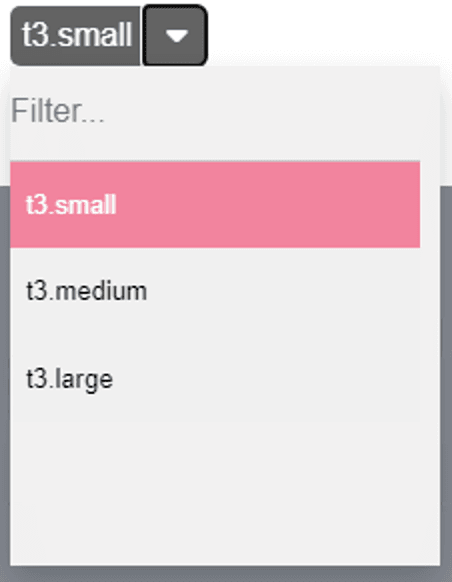
- /EDR/INSTANCE/TYPES,
thiscontains the list, column separated, of allowed instance types for DB on EC2. Note the first one will be shown as default.
t3.small, t3.medium, t3.large
Rendering example:
- /EDR/RDS/CONFIGURATION/POSTGRES, holds the configuration object for RDS DB creation.
- Engine: type of database.
- EngineVersion: version of database.
- DBName: Name of database
- MasterUsername: administration user.
- MasterUserPassword: administration user’s password.
- DBSubnetGroupName: AWS RDS VPC
- VpcSecurityGroupIds: Security group id for AWS RDS. Note: If you don’t know how to create this security group, you can create a dummy RDS and create a new security group. This security group need to be linked to all EC2 connecting to RDS.
These properties can be found from AWS SDK documentation https://docs.aws.amazon.com/AWSJavaScriptSDK/v3/latest/client/rds/command/CreateDBInstanceCommand/
Below is an example of minimal configuration:
{
"Engine": "postgres",
"EngineVersion": "15.3",
"DBName": "mydb",
"MasterUsername": "postgres",
"MasterUserPassword": "************",
"DBSubnetGroupName": "default-vpc-0e5eb8643bc6ea34d",
"VpcSecurityGroupIds": "sg-09b97c0863d87d715"
}
- /EDR/RDS/INSTANCE/CLASSES, contains the list of allowed instance type for RDS.
db.t3.micro, db.t3.small, db.t3.medium, db.t3.large
- /bluage/resource/certificate/pem, holds bluage.local Root CA certificate. This is used to install the certificate on hosts.
Example: Setting up bluage.local CA root certificate in Windows server:
- Copy and paste the key content in notepad and record the file as “root-ca.crt”.
- Open Windows certificates manager (type “certificate” in windows menu). Then right click on “Trusted Certificate Authorities” and select “import”.
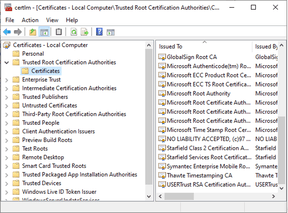
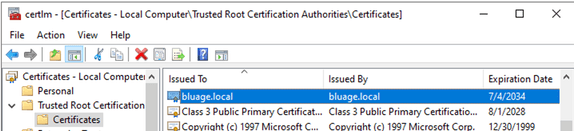
- Browse and the select the “root-ca.crt” that was previously recorded. After importing the certificate, you should see an entry “bluage.local”:
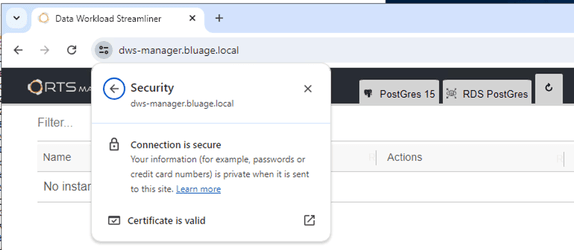
- Open https://dws-manager.bluage.local. The connection should be marked as secured.
RTS API
API can be access via http REST. There is a documentation page available from the RTS front application: https://dws-manager.bluage.local/api-documentation/
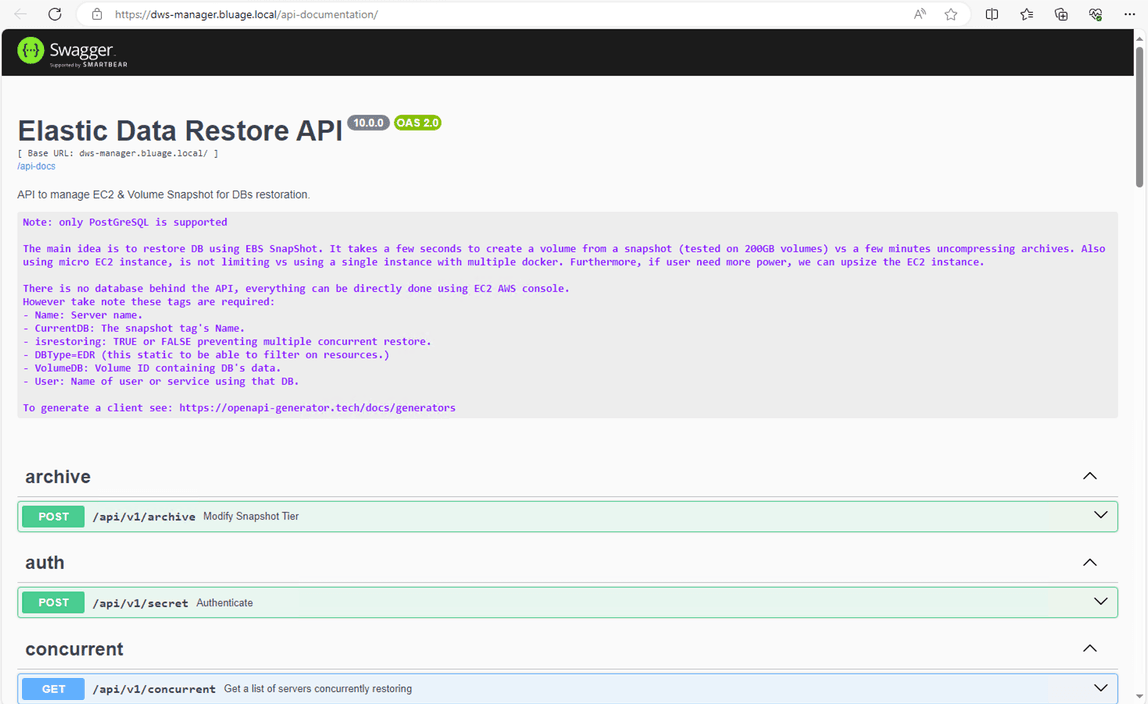
Note the rest API cannot be tested from the Open API Swagger interface since it requires authentication.
DB on EC2
Database are setup on EC2 instance, these database are solely dedicated to testing, not for production. Furthermore, if a test case requires heavy load on the database we recommend using RDS/Aurora. The primary goal of DB on EC2 is speed as a database restoration from a snapshot takes around 55 to 90 seconds, versus RDS which more around 300 to 900 seconds.
These EC2 instances can be deleted from AWS EC2 web console or AWS CLI/SDK. However, it will take up to 5min for changes to appear in RTS web application. As we do not want to pollute AWS API, these information are stored in Redis local server.
Encryption
By default, data volumes are mounted on /data and the device is always name /dev/sdg. Volume are encrypted using either default KMS aws/ebs or a key alias set up in SSM Parameter Store: /EDR/KEY/ID = Key Alias.
SSL activate, each database have their own certificate x509 and data are encrypted in transit. The encryption can be verified by running SQL or PostgresSQL command:
show ssl;
-- this should output
-- on
SELECT pg_stat_ssl.*
FROM pg_stat_ssl
LIMIT 1;
-- this should output:
-- 64 true "TLSv1.3" "TLS_AES_256_GCM_SHA384" 256
AWS EC2 Tags
Tags are present on EC2 hosting database. this These tags are required for RTS to operate:
| Tag name | Description |
|---|---|
| dws:db:user | User name owning the db. |
| aws:ec2launchtemplate:version | Version of the launch template when instance was created. |
| dws:db:type | Constant tag, equals: DWS |
| dws:db:volume | ID of the EBS volume |
| Name | Name of the instance, it will be recorded in Route 53/bluage.local zone. The name must be unique. |
| dws:db:isrestoring | Flag set to TRUE if database is beeing restored. |
| dws:db:instance:type | Type of database, this value is taken from the configuration key: /EDR/DOCKER/COMPOSE/INSTANCES, contains the definition for databases available in RTS Manager. This will produce the tab menu to select a database… |
EBS Snapshots
For DB on EC2, all snapshots are coming from EBS. The snapshots contains tags retaining information on the volume and the type of database.
List of tags present on snapshots:
| Tag name | Description |
|---|---|
| dws:snapshot:disk:type | Class definition for volume (gp3, gp2, io1) |
| dws:snapshot:disk:io | Number of IOs |
| Name | Name of snapshot (must be unique) |
| dws:db:instance:type | Type of database, this value is taken from the configuration key: /EDR/DOCKER/COMPOSE/INSTANCES, contains the definition for databases available in RTS Manager. This will produce the tab menu to select a database… |
| dws:db:type | Constant tag equals: DWS |
Note: dws:db:instance:type must be equal between snapshot and EC2 when restoring
asnapshots. If the type of database change, this tag should be updated.