
How do pipeline work?
Introduction
The purpose of this documentation is to explain the working of pipelines. This is not a technical documentation but we will dive into the working of the pipelines. I will explain their architecture and how they work. We made 2 pipelines, a building pipeline that builds the application and deploy it on an ECS and a testing pipeline that deploys the test case files on a Jenkins EC2 and create a job for each test case.
Building Pipelines
The building pipeline is the pipeline for building the application. This pipeline is made up of 2 pipelines, the first one builds a basic Docker image homing server configuration files and the second builds the final image.
Pipeline overview
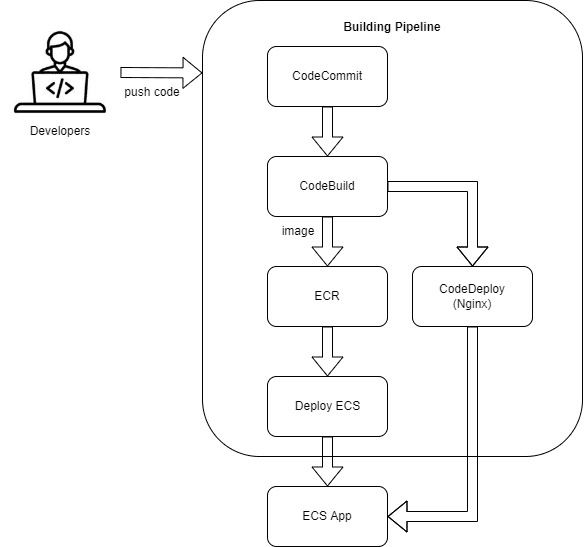
The pipeline is made up of 4 phases. The first one fetches the entire source code of the project in CodeCommit, followed by a building phase that will be explained more deeper later. Finally, we have 2 phases of deployment, one for deploying Nginx and the other one for deploying the application. See below an overview diagram of the pipeline.
Deeper inside the CodeBuild phase
The CodeBuild phase has been improved over time which makes it very complex. First of all, here is a diagram of it.
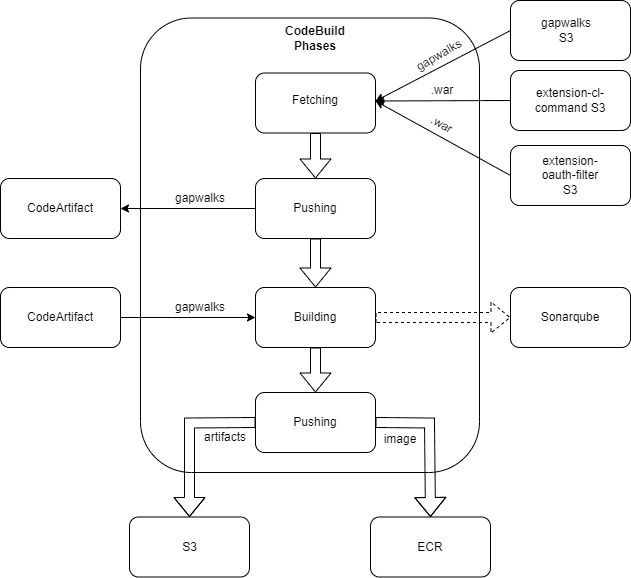
The initial step is to fetch gapwalks from Velocity S3 and depending on the project 2 more files as well, extension-cl-command.war and extension-oauth-filter.jar. The next step is to push these gapwalk dependencies to the CodeArtifact of our AWS account. We then build the application using the gapwalk freshly pushed and create a Docker image homing the .war files of our application on top of a Tomcat server. The VERSIONS environment, and only this one, will run Sonarqube for analyzing basic mistakes of the source code. The last step is for pushing the docker image in an ECR and pushing the .war files of the compiled version in an s3 for retention purpose.
Note: CodeBuild phases are quite similar on all the environments. Specific variables for environments are specified in the Parameter Store
Deployment
The application is deployed on ECS with one ECS for each environment. Each ECS runs 3 Docker images: the application, an Nginx, and a RabbitMQ image. The ECS service is updated to the latest version (the one specified in the pom.xml file of the project) each time the main pipeline is executed allowing us to make sure the version running on the ECS is the last one.
Where can you find the instances of the application?
The instances of the application can be found in the AWS EC2 console usually named
ecs-<AwS_REGION>-<PROJECT_NAME>-<ENVIRONMENT>.
Environments
The CI/CD has 3 environments, that is, INT, UAT and VERSIONS.
- INT: Based on develop branch
- UAT: Based on master branch
- VERSIONS: Based on a particular branch using non SNAPSHOT gapwalks and obfuscated code
The pipeline presented above is duplicated for each environment. The files used by the pipelines are the same no matter the environment so it’s easily maintainable, however they follow a different path depending on the environment. (e.g the VERSIONS branch runs Sonarqube and not the others). Pipelines also differs by the variables defined in Parameter store usually called /<PROJECT_NAME>/VARIABLES
Testing Pipelines
The testing pipeline is the pipeline for running the test cases on the application deployed by the pipeline above. This pipeline merely sends test case files to the Jenkins EC2 and triggers the Jenkins pipeline running the test cases.
AWS Pipeline
Here is a diagram of the AWS testing pipeline
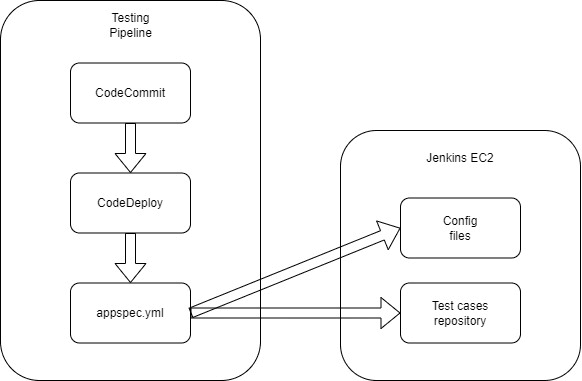
This pipeline starts with fetching the CodeCommit repository, containing Jenkins config files, pipelines files, and the test cases directory. Then, it uses CodeDeploy to deploy all these files on the Jenkins EC2. When the deployment is done, we call the Jenkins pipeline.
Note: INT Jobs on Jenkins will be created and run automatically every night at midnight. Otherwise, when this pipeline is triggered it only creates the jobs on Jenkins.
Specific pipeline for AWS account containing 2 projects
Here is another version of this pipeline for client having 2 projects on the same account.
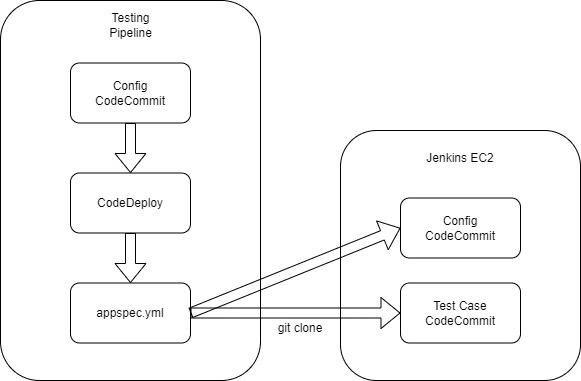
As we can only have one CodeCommit source repository using CodeDeploy. The hack is to have a Config CodeCommit repository containing the config files of Jenkins, pipelines, etc and 2 other CodeCommit repository containing the test cases directory, one for each project. The pipeline is linked to the Config CodeCommit repository for pushing the config files to the Jenkins EC2 and at the end of the deployment I use a script in the appspec.yml file to git clone the CodeCommit repositories containing all the test case files of the 2 projects on the Jenkins EC2. Then, we can trigger the Jenkins pipeline.
Jenkins Pipeline
You can find the Jenkins pipeline in the Pipelines view of Jenkins. The pipeline is called Run all jobs.
Note: It will be certainly renamed Job Runner later
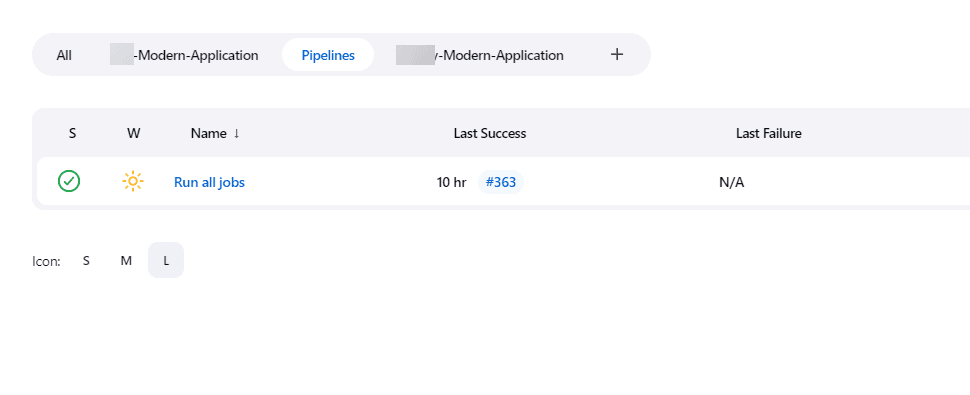
This pipeline is started by the AWS pipeline using CLI at the end of the deployment. Depending on the tree structure of the codecommit-<PROJECT_NAME>-test_cases repository, it will create some views and nested views. Basically, the root directory will be the name of the view in Jenkins (e.g -Modern-Application), then ITC and BTC will be nested views inside that view and finally you will find INT or UAT for the environments. Once the views are created, the script iterates over all the test case directories and creates a Jenkins job for each of them.
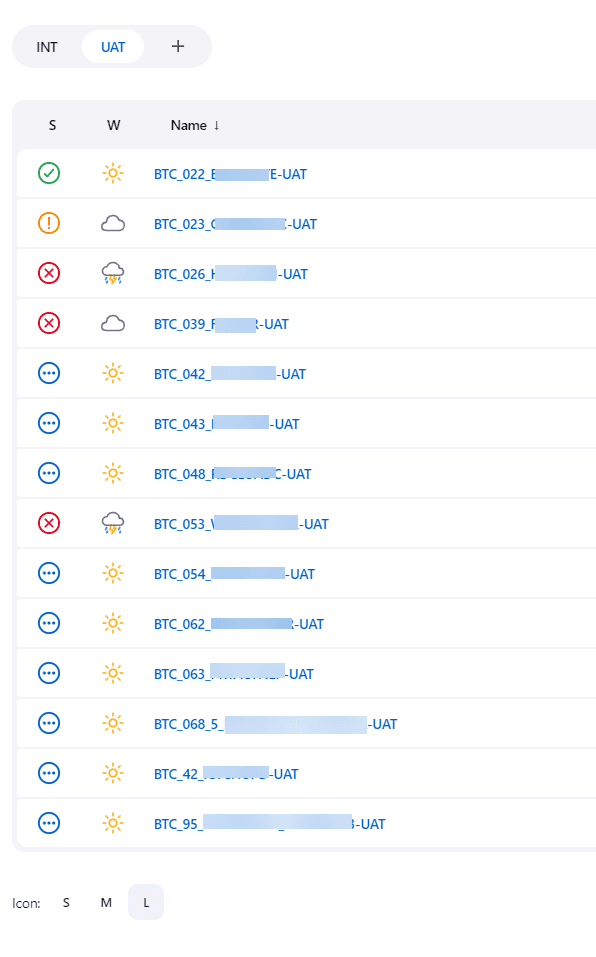
The Jenkins pipeline updates all jobs as well. Each job is actually a variabilized XML file, so if this XML file changed, all the jobs will be updated with the new configuration. All the jobs are based on the same configuration and call the same script. Then, depending on their name (the name is parsed), they will take different paths. (e.g if I find “UAT” in the name of the job, the job will be executed on the UAT environment, etc.)
All the jobs have the same phases when running:
- Restoring the initial and expected database
- Running DataMigrator script
- Running Groovy Script
- Running Selenium Script
- Running CompareDB script
Then depending on their tree structure they will skip some phases. So, of course if you have an ITC test case with no Groovy script this phase will be skipped.